
Breach Secure Now (BSN) Security Awareness Training Platform
Frequently Asked Questions
To help with your BSN training journey, here are the answers to a few of the most frequently asked questions when using Eagle’s PII Protect security awareness training platform.
Frequently Asked Questions
How do I log in?
Go to https://portal.breachsecurenow.com/#/login and enter your work email address. If your organization uses Single Sign On, once prompted the work email, it will ask for you to sign in to your Microsoft or Google account.
If your sign-in screen looks different or you are unsure which method to use, contact support.
What should I do after logging in?
Select Edit Profile below your name, enter a screen name and any other requested information, and save your profile.
Open My Dashboard, select Training, and complete any required course marked incomplete.
After the course, take the final quiz and score 80% or higher to pass and receive credit.
How do I report or check a suspicious email?
If an email looks suspicious, do not click its links, open its attachments, or reply.
In Microsoft Outlook, open the message, select Catch Phish, and choose Email Analysis. Review the result and, when prompted, send the message to your IT team for review.
If you do not have Catch Phish and/or do not use Microsoft Outlook, report the email to your IT team
I lost or never received my welcome email. What should I do?
Check your Archive, Trash or Deleted Items, and Junk or Spam folders for an email with the subject Welcome to BSN.
If you cannot find it, contact support and ask for the message to be resent.
I forgot my password or cannot log in. What should I do?
On the login page, enter your email address and select Forgot Your Password?.
Submit the email address used to register you, then follow the reset instructions sent to that address.
If your account is locked or you still cannot sign in, contact support.
Training and Program Details
Why Do I Have to Take a Cybersecurity Course?
It seems like we cannot go a day without hearing about another data breach or cybercriminal activity in the news. Many additional breaches do not receive news coverage, including breaches affecting organizations like ours.
Cybercriminals are targeting small and medium-sized organizations more than ever. Our organization has an important responsibility to protect confidential information, employee W-2s, client information, and any other data we store, access, or transmit.
Unfortunately, human error accounts for most data breaches. One minute it is a normal, busy day in the office. The next, someone may accidentally click the wrong link, approve a convincing request to purchase gift cards, wire money to the wrong account, or allow an outsider to access the network.
The good news is that most of this can be prevented through ongoing education and routine testing. That is why we have partnered with Eagle Consulting Partners to stay up to date on the latest threats and do our part to protect our organization. Technology alone is not enough anymore.
Being well trained in cybersecurity will help protect our organization and the individuals whose information we may access.
What Does This Program Consist Of?
The security awareness program includes:
- Annual Security Awareness Training
- Weekly micro-training videos and quizzes
- Weekly security tips
- Monthly security newsletters
- Simulated phishing emails
- Dark Web monitoring and scans
- Employee Secure Scores
- A company leaderboard
- The Catch Phish Outlook tool
The program is designed to fit into a busy schedule. The micro-training videos and quizzes can generally be completed in approximately five minutes.
Annual Security Awareness Training
You are required to complete Annual Security Awareness Training each year. New annual training is released shortly after January 1st.
The training covers the basics of keeping your organization and yourself secure while working online. Topics include:
- Safe web browsing
- Safe email practices
- Recognizing phishing
- Recognizing social engineering
- Protecting personally identifiable information, or PII
- Understanding how data breaches occur
- Learning how incidents could have been avoided
The training is made up of case-study-based videos that provide real-life examples of incidents that can happen to anyone at any time. The course includes lessons learned, details about each incident, its outcome, and how it could have been avoided.
The training should take approximately 40 to 45 minutes to complete.
You do not have to complete the training in one sitting. You can stop and start the training at any time. When you return, click Resume to continue where you left off.
After completing the course, you must complete a 20-question quiz. You must receive a score of 80% or higher to pass and receive credit for completing the training.
If you do not pass the quiz, you may retake the training and quiz as many times as necessary.
After successfully completing the quiz, you will have the option to print your training certificate. You do not need to print the certificate unless your management has asked you to do so.
Completing the Required Security Training and passing the Security Quiz are required by your management.
Weekly Micro-Training Videos and Quizzes
Each week, you will receive an email containing a link to a micro-training video about the latest cybersecurity threats.
The micro-training videos are generally one to three minutes long. Following each video, you will see a short four-question quiz based on the content you watched.
The more quizzes you complete, the higher your Employee Secure Score can climb. Take the five-minute break and educate yourself on what to look out for that week.
You will receive a micro-training email every week. Three weeks out of the month, the email will contain a video and quiz. Once per month, the micro-training email will include a Monthly Security Newsletter.
The weekly micro-training email may come from Eagle Consulting Partners at:
You are encouraged to keep up with the micro-training modules sent in the Weekly Security Tip emails. Taking more micro-training modules and quizzes will improve your Employee Secure Score.
Simulated Phishing Emails
You will receive simulated phishing emails in your inbox. These emails are sent to test your security awareness and your ability to recognize different types of phishing attacks.
Phishing is the number one attack method used by cybercriminals. Being able to recognize a malicious email can help protect you and the organization.
Simulated phishing emails may be sent every week or every couple of weeks. Once you have completed some training, you should be better able to determine when it is safe to click an embedded link and when you should be suspicious.
Use your training to identify these simulated phishing messages and possible real phishing emails. If you receive what appears to be a phishing email, follow your organization’s procedures to report it to your IT team or delete it.
What Happens If I Click a Simulated Phishing Link?
If you mistakenly click a link in a simulated phishing email, a screen will appear to notify you that you should not have clicked the link, together with a short video with a small training note.
Clicking a link in a simulated phishing email will negatively affect your Employee Secure Score.
Dark Web Monitoring
As part of the program, your organizational email address will be continually monitored on the Dark Web.
Dark Web monitoring looks for email addresses in collections of stolen accounts and passwords. If your email address is discovered, you will be notified so you can take the appropriate next steps, such as quickly updating your password.
The more you know, the better you can protect yourself and your organization.
Employee Secure Score and Other Features
Employee Secure Score
Each employee is given an Employee Secure Score, or ESS.
The Employee Secure Score is like a credit score for your security awareness and security strength. The score is generated by combining multiple security-related metrics, including:
- Your annual security training score
- Your micro-training quiz scores
- Your simulated phishing fail rate
- Your participation in weekly training activities
- Your user profile
- Dark Web monitoring results
The higher your Employee Secure Score, the more likely you are to defend against a data breach. Get your score in the green.
Positive ESS Contributors
The following activities positively contribute to your Employee Secure Score:
- Setting up your user profile
- Completing your annual training by the assigned deadline
- Receiving a higher score on the annual quiz
- Retaking the annual quiz to improve your final score
- Watching weekly micro-training videos
- Completing weekly micro-training quizzes
- Identifying a simulated phishing email using the Catch Phish Email Analysis tool
Negative ESS Contributors
The following activities negatively contribute to your Employee Secure Score:
- Clicking a link in a simulated phishing email
- Having your organizational email identified on the Dark Web
- Performing poorly on a weekly micro-training quiz
- Not completing a weekly micro-training quiz
- Not watching weekly micro-training videos
- Incorrectly identifying an email as a simulated phishing message when it is not a phish
Leaderboard
The leaderboard allows you to compete head-to-head with your coworkers and see who has the highest Employee Secure Score.
Do not forget to select a good screen name. Avoid using special characters such as !, *, or # in your screen name.
Have fun and enjoy the healthy competition.
How to Complete Annual Security Awareness Training
| 1. Log into the portal, https://portal.breachsecurenow.com/#/login |
| 2. Navigate to the “Training” tab within “My Dashboard” |
| 3. Find the training course(s) that you have not yet completed with the minimum required grade. |
| 4. Click the “Watch” button to watch the Training course. Please note that you can pause the training and resume where you left off at any time. |
| 5. Click “Final Quiz” to complete the quiz to test your knowledge of what you have learned. |
Catch Phish Email Analysis Tool
Catch Phish is an Outlook tool that helps you identify simulated phishing emails and evaluate suspicious messages.
The tool is available on your laptop, desktop, and mobile device through the Microsoft Outlook application only.
Catch Phish has two functions:
- Catch Phish Email Analysis
- Catch Phish Security Training
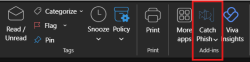
Catch Phish Email Analysis on a Desktop
To use Catch Phish on your desktop:
- Open an email that you would like to analyze.
- The email may be one that you suspect is a simulated phishing email or another message you believe is suspicious.
- After you select the email, the Catch Phish buttons on the right side of the Outlook toolbar will no longer be grayed out.
- Click Email Analysis to analyze the message.
Catch Phish in Outlook on a Smartphone
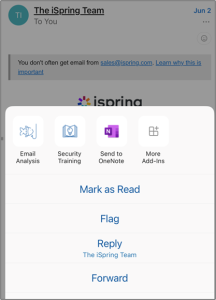
To access Catch Phish in the Outlook application on your smartphone:
- Open an email.
- Click the three dots in the upper-right corner.
- Select Email Analysis to verify whether the message is a simulated phishing email or to receive more information about a link.
- Select Security Training to access the annual security training and micro-training modules.
Catch Phish: Phish Caught
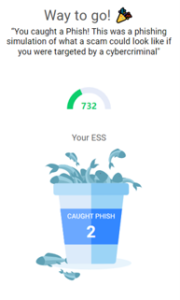
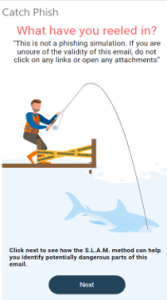
If the email is a phishing simulation, you will be notified that you caught a phish.
You will see confetti, and your Employee Secure Score will increase.
Catch Phish: Email Is Not a Phish
If the email is not a phishing simulation or an actual phishing email, you will be notified, and your Employee Secure Score will decrease.
You can click Next for more information.
If you are unsure about the email, Catch Phish will calculate the probability that a link is malicious and provide additional information. You can review the assessment and determine whether you want to click the link.
Catch Phish Security Training
If you click the Security Training button, you will have access to:
- A library of micro-training videos
- Micro-training quizzes
- The Annual Training course
- The Annual Training final quiz
Click the Annual Training button to access the annual training course and its final quiz.
Need Additional Support? Any Questions Not Covered Here?
Contact Gary Pritts or Felipe Araujo for additional support:
Email: [email protected] | [email protected]
Cybersecurity Is a Continuous Process
Cybercriminals never stop learning new ways to access our network and data. This means we cannot stop learning either.
Thank you for helping keep the workplace safe. We know you are busy, and we appreciate your hard work.
Help protect each other by staying up to date with cybersecurity training. It takes all of us to stop cybercriminals.
Having a strong cybersecurity program is critical for maintaining strong safeguards against cybercriminals and protecting the client data we store, access, or transmit.